
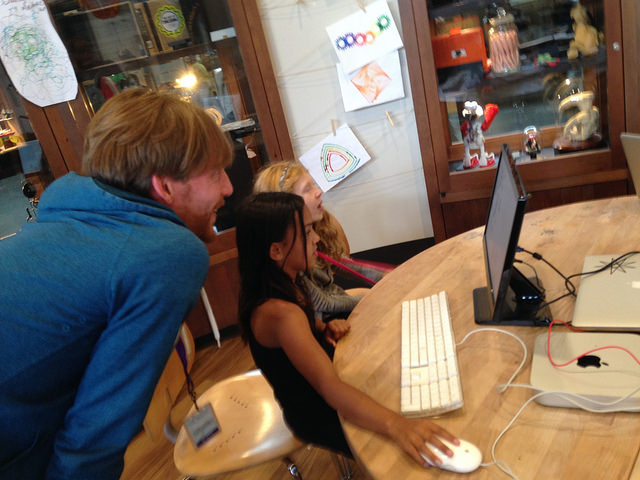
 We've been spending a lot of time in our R&D space, continuing our experiments with beetleblocks and watercolorbot. We've been thinking about ways to start introducing these tools and technologies to visitors to the Exploratorium. As normal, we decided to start out slow, only working with small groups of participants to prototype how programming and digital fabrication can run as drop in activities in our public workshop space.

We made the environment a little more cozy than our usual setup so that we could really focus on faciliation with a limited number of participants. We put two computer stations on the round table and had a tall workbench for the watercolorbot, a vinyl cutter, and a third computer dedicated to controlling those tools. There was also one extra table set up for cutting the sheets of vinyl
to load into the cutter.
 The first part of the workshop was introducing the beetleblocks program to learners. Quite a few of the kids had some experience with either scratch or another visual programming tool which was helpful for our introduction. I had a couple cards with the 'program' for basic shapes on them to help people get going. The programming alone seemed pretty interesting to people and many spent anywhere between thirty minutes to an hour messing around with the coding.

One interesting thing that we noticed from observing the kids experiments with beetleblocks, was that many of them created a couple blocks of code to use almost as drawing tools, pressing the blocks to create interesting patterns. This was a nice way of testing things out but was a little challenging for us as facilitators because we couldn't necessarily trace back the pattern.
Another thing that we saw was that people didn't have a lot of context for what numbers went in the blanks in the blocks. For example, there's no way of knowing that the 'rotate' block needs an angle between 1-360, the grid is 10x10 and the number of repeats can quickly multiply to be something that will take a prohibitively long time to paint on the watercolorbot.
 We thought that having the choice of watercolor bot or craftrobo vinyl cutter to bring peoples designs in the real world would be good for a couple reasons. First we thought that different designs might work better on one tool or the other depending on if people used lots of colors, how intricate the designs were, and the learners' interest. Also it was helpful to have two tools that could be running simultaneously so that in case there was a really long job on the watercolorbot, people could still make a sticker.

The vinyl stickers (especially the glitter ones) were really popular and it takes quite a bit less time and space than any of the other digital fabrication tools which is an advantage on the museum floor. One drawback is that there's a little more 'tweaking' of the file that needs to happen by us in Illustrator which takes away a faciliator for a longer amount of time. Overall the switching between computers, USB drives, and programs still feels a bit clunky and is something that we'd like to work on streamlining and possibility putting more in the hands of the participants.

Just testing out the activity for the first time gave us lots of ideas and things to try for future workshops. The first thing that I'm interested in changing, is making the 'handouts' more open ended but also more descriptive. Instead of showing people how to make something like a triangle or circle, I now feel it would be better to give the general structure (same for each) and describe what the black spaces mean, allowing people to do the experimentation for themselves. I could imagine several 'example' handouts that introduce some of the aspects of the language like random numbers, variables, or repeating patterns.
Additionally I think it will be good to experiment with the way we introduce the connection between the programming and the digital tools. I think on one hand it's a really nice experience for people to take something from the digital to the physical world, but I'm still unsure how the limitations of the tools or materials either add to or take away from the tinkerability of the activity. It will be really fun to continue to test out the programming, design, and digital tools in the Tinkering Studio as we experiment with different ways of running the workshop.