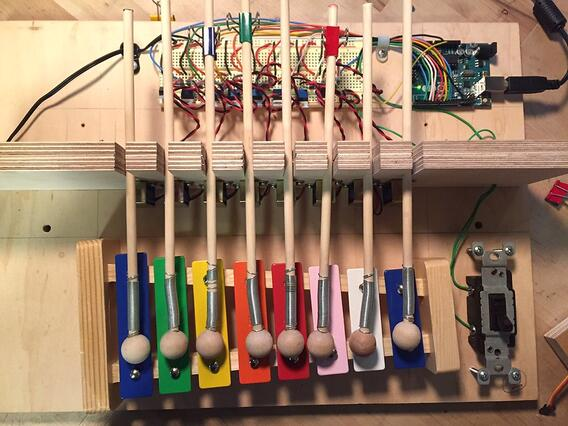
We have been experimenting with computational tinkering recently, and after programming computers to create light shows, paint with water-colors, and print three dimensional art, I found myself wondering about other playful, open-ended outputs that we could experiment with. There are some fabulous examples of automated musical instruments out there, like player pianos, and I thought it might be fun to create a player piano that you could program with scratch. Player pianos are controlled by rolls of paper with punched out holes, which works really well, but you can't alter the melody. They are pretty amazing contraptions, but not as good for tinkering!
Luckily, there is a great new extension that lets you program an Arduino with Scratch. Arduinos are little computers that you can connect to all sorts of inputs and outputs, like switches, motors and solenoids. Eventually, I am hoping to build an player piano with lots of musical instrument outputs (like drums, bells, whistles, a triangle . . . ), and hopefully some interesting inputs (like sensors), but I started simple with a xylophone, because it is friendly and familiar, and it can play 8 different notes. I decided to use solenoids, because they are lovely little devices that can push or pull something when you run electricity through them, which means they should be able to hit a key on a xylophone.
I wired up 8 solenoids, one for each note on the xylophone, and I connected each solenoid to a pin on the arduino. Each note can be played by telling the arduino to turn on a pin and trigger a solenoid, which hits a mallet, which plays the xylophone. Whew!
You can see how to make your own scratch player piano circuit here. I am using the solenoids to play a xylophone, but they could play drums, or triangles, or tambourines . . .

At first, I tried playing the xylophone directly with the solenoids, but the notes sounded really dull. The next thing I tried was making the solenoids hit mallets, which played the xylophone. That was more satisfying, but the notes still sounded really flat and muted, so I added springs.  Much better! Once I had a working prototype, I started playing around with the programming. This is really just the starting point, and the beauty of a scratch-powered player piano is you can compose and play music in real time. That immediate feedback makes it easy to iterate and experiment, and a musical instrument is a great output because it is really open-ended. The Scratch extension for Arduino looks pretty similar to traditional Scratch, but it has a bunch of new blocks that let you control inputs and outputs. You can still make Scratch animations, and the combination is super fun.

It certainly seems like the beginning of an interesting project, and I am curious to see where it leads. Right now I have an old drum kit sitting by my desk, just waiting to be built into a player piano. And I heard that you can play organ pipes with solenoids and a vaccum cleaner, so the future is looking pretty bright.